
This page answers some of the common questions asked by our subscribers. Feel free to drop us an email if you have any queries, we will be more than happy to help. We are constantly on the look out for ideas to improve REF-N-WRITE’s functionality, so please don’t be shy let us know your thoughts.
No, it is a one off payment and you will get a lifetime license. We like to keep it simple and economical for you.
Use the discount code PROMO30 to get a 30% student discount. You can also drop an email to contact@ref-n-write.com requesting a student discount, we will send you a promo code.
Yes, REF-N-WRITE works on Windows, Mac and Online Office. Please note Windows is a desktop application, whereas Mac and Online Office versions are Web Addins. There will be some differences in GUI appearance and features between both versions.
You can use the license in two devices that belongs to you.
Yes, you can use the same license in two devices even if one is running Windows and other is running Mac
Your 1-year Ref-n-Write license includes 15 pages of full plagiarism reports at no additional cost. If you have a lifetime license, it includes 30 pages of full plagiarism reports.
Once the included page limit for full reports is used, additional pages can be purchased for a small fee, as these reports are generated using Copyleaks, an external service provider.
Plagiarism checks against internal documents that you upload to your dashboard are available free of charge and are included with your software subscription.
Ref-n-Write and Turnitin use different databases and matching algorithms. Ref-n-Write’s plagiarism checker (powered by Copyleaks) scans a broad range of online and academic sources, while Turnitin focuses heavily on university submissions and institutional repositories. Because they compare your text against different collections of content and apply different matching rules, small differences in similarity scores are normal and expected.
Ref-n-Write’s AI detector may show a 0% AI score while other detectors report a higher value because AI-detection tools use different models, rules, and thresholds. Ref-n-Write is specifically optimized for academic writing, whereas many external detectors are more aggressive and often misclassify formal, structured academic language as AI-generated. This is a known limitation of current AI-detection technology.
If you want to be extra cautious, you can use the Ref-N-Write Humanizer tool to rewrite the text multiple times and then check it across multiple AI detectors until the AI score is consistently low or zero. However, it’s important to remember that formal academic writing will always carry a higher risk of false AI flags, even when the work is entirely your own.
Most universities are aware that AI detectors can produce false positives and do not rely on AI scores alone when evaluating academic work. As long as the content is genuinely yours and you can explain your writing if required, there is usually no cause for concern.
Yes, Ref-n-write also comes as a Google Doc Plugin.
Ref-n-Write is a Microsoft Word Add-in. The software goes through rigorous testing before each release. In addition, it is tested by the Microsoft team before publishing in the Office store.
Yes, it is normal. Any software executable file downloaded from the internet will be viewed suspiciously by the anti-virus software. So don’t worry, just disable the anti-virus for a couple of minutes and reactivate once installation is complete
Due to the digital nature of Ref-n-Write, refunds are limited. If you upgrade from a trial version to the full version, no refunds are provided, as you have already had the opportunity to evaluate the software before purchase.
Additionally, if your license has been used to generate a plagiarism or AI detection report, refunds cannot be issued because an immediate, non-recoverable cost is incurred through our external service provider, Copyleaks.
Refunds may only be considered in exceptional cases, such as duplicate charges or verified technical issues that prevent access to the software.
At the moment REF-N-WRITE Windows supports MS word, PDF and text files. Please note, you can only import PDF files in the Mac, Online Office and Google Doc versions.
The maximum limit on the pages is 500; this is to avoid crashing MS word while importing.
There is no limit of the file size on Windows. However, there is a 20MB limit on file size on Mac, Online Office and Google Doc versions.
We don’t do anything with your documents. All the documents you import are store locally on your device.
They are stored in a folder called “REF-N-WRITE” under “My Documents” in your PC. Please don’t touch it, you might corrupt something.
The page limit of the imported documents has been set to 100 by default. You can increase the limit to 500 under settings.
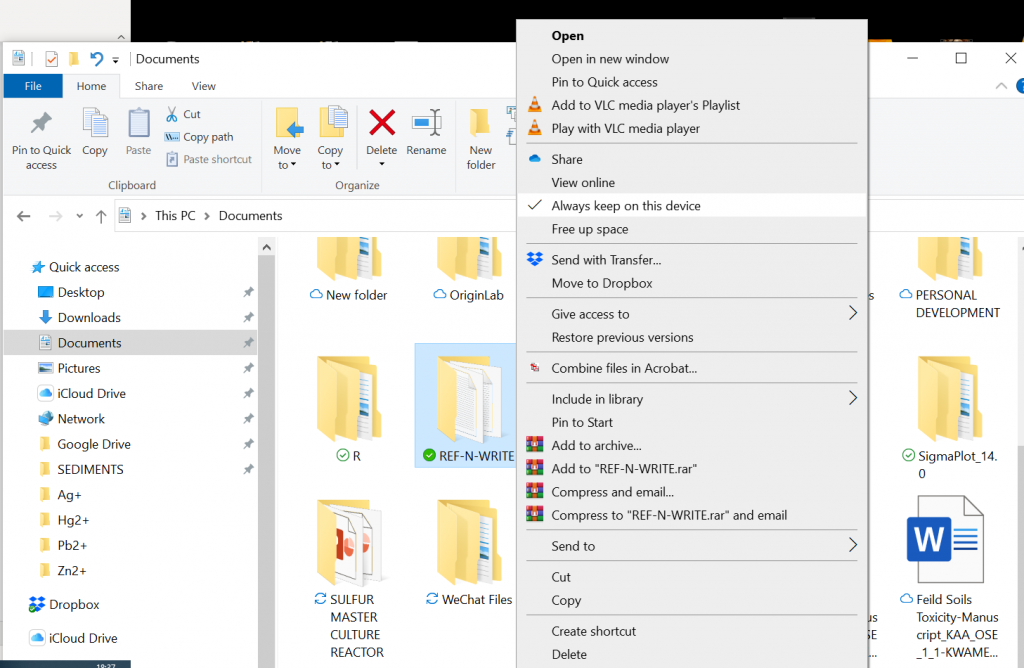
This might happen if you have your “My Documents” folder in OneDrive. You have to right click on the “My Documents->REF-N-WRITE” folder and select “Always keep on this device” option under OneDrive properties.
Ref-n-write checks for plagiarism for free against internal documents you import in the dashboard. If you need a full plagiarism report you need to pay a small fee since the service is provided by ‘Copyleaks’ an external company.
This normally happens when you try to activate your license on a new computer. Don’t worry, just drop an email to contact@ref-n-write.com, and the support team will reset the license for you.
Ref-n-write can only be used as a Microsoft Word Addon or Google Docs Plugin. The website is for demonstration purposes only, you need to install the app on your computer to use the tool. You will find the download links below.

